
126 lines
3.7 KiB (Stored with Git LFS)
Markdown
126 lines
3.7 KiB (Stored with Git LFS)
Markdown
KlakSpout
|
|
=========
|
|
|
|

|
|

|
|
|
|
**KlakSpout** is a Unity plugin that allows Unity to send/receive video streams
|
|
using the [Spout] system.
|
|
|
|
[Spout]: http://spout.zeal.co/
|
|
|
|
System requirements
|
|
-------------------
|
|
|
|
- Unity 2020.3 or later
|
|
- Windows system with DirectX 11/12 support
|
|
|
|
Currently, KlakSpout only supports Direct3D 11 and 12. You can't use other
|
|
graphics APIs like OpenGL or Vulkan.
|
|
|
|
How to install
|
|
--------------
|
|
|
|
This package uses the [scoped registry] feature to resolve package dependencies.
|
|
Please add the following sections to the manifest file (Packages/manifest.json).
|
|
|
|
[scoped registry]: https://docs.unity3d.com/Manual/upm-scoped.html
|
|
|
|
To the `scopedRegistries` section:
|
|
|
|
```
|
|
{
|
|
"name": "Keijiro",
|
|
"url": "https://registry.npmjs.com",
|
|
"scopes": [ "jp.keijiro" ]
|
|
}
|
|
```
|
|
|
|
To the `dependencies` section:
|
|
|
|
```
|
|
"jp.keijiro.klak.spout": "2.0.3"
|
|
```
|
|
|
|
After changes, the manifest file should look like below:
|
|
|
|
```
|
|
{
|
|
"scopedRegistries": [
|
|
{
|
|
"name": "Keijiro",
|
|
"url": "https://registry.npmjs.com",
|
|
"scopes": [ "jp.keijiro" ]
|
|
}
|
|
],
|
|
"dependencies": {
|
|
"jp.keijiro.klak.spout": "2.0.3",
|
|
...
|
|
```
|
|
|
|
Spout Sender component
|
|
----------------------
|
|
|
|

|
|
|
|
You can send a video stream using the **Spout Sender** component. There are
|
|
three capture methods available:
|
|
|
|
- **Game View**: Captures the content of the Game View.
|
|
- **Camera**: Captures a specified camera.
|
|
- **Texture**: Captures a 2D texture or a Render Texture.
|
|
|
|
Note that the Camera capture method is only available on URP and HDRP -- You
|
|
can't use it on the built-in render pipeline.
|
|
|
|
The **KeepAlpha** property controls if it keeps or clears the content of the
|
|
alpha channel. Note that you have to enable [alpha output] when using HDRP.
|
|
Also note that you have to use the Texture capture method to enable alpha
|
|
output on URP.
|
|
|
|
[alpha output]:
|
|
https://docs.unity3d.com/Packages/com.unity.render-pipelines.high-definition@12.0/manual/Alpha-Output.html
|
|
|
|
Spout Receiver component
|
|
------------------------
|
|
|
|
|
|
|
|
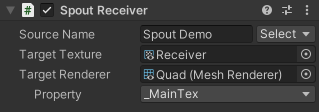
You can receive a video stream using the **Spout Receiver** component. It stores
|
|
received frames to the Target Texture. It also overrides a material property
|
|
specified in the Target Renderer.
|
|
|
|
You also can refer to the received texture via the
|
|
`SpoutReceiver.receivedTexture` property.
|
|
|
|
Scripting interface
|
|
-------------------
|
|
|
|
You can enumerate available Spout senders using the `SpoutManager` class.
|
|
Please check the [SourceSelector example] for further usage.
|
|
|
|
[SourceSelector example]:
|
|
https://github.com/keijiro/KlakSpout/blob/main/Assets/Script/SourceSelector.cs
|
|
|
|
You can dynamically create a Spout sender/receiver, but you must give the
|
|
`SpoutResources` asset (which holds references to the package assets) after
|
|
instantiation. Please see the [benchmark examples] for detailed steps.
|
|
|
|
[benchmark examples]:
|
|
https://github.com/keijiro/KlakSpout/blob/main/Assets/Script/SenderBenchmark.cs
|
|
|
|
Frequently asked questions
|
|
--------------------------
|
|
|
|
### What's the difference between NDI and Spout?
|
|
|
|
- NDI: Video-over-IP codec/protocol
|
|
- Spout: Interprocess GPU memory sharing on DirectX
|
|
|
|
NDI requires CPU/memory/network load, but it's greatly versatile.
|
|
|
|
Spout doesn't produce any CPU load, but its range of application is limited.
|
|
|
|
If you're trying to share videos between applications running on a single
|
|
Windows PC, Spout would be a better solution.
|