
3.5 KiB (Stored with Git LFS)
Python SDK
This is a Python SDK for developing Stream Dock plugins, providing simple and easy-to-use API interfaces and a complete development toolchain. It implements real-time communication with Stream Dock software through WebSocket.
Features
- WebSocket Communication: Provides real-time communication with Stream Dock software
- Event Handling: Supports handling of button clicks, setting changes, and other events
- Timer: Supports setting up timed tasks and periodic tasks
- Logging System: Integrated logging functionality for debugging and troubleshooting
Project Structure
.
├── src/                # Source code directory
│   ├── core/          # Core functionality modules
│   │   ├── action.py        # Action class, handles button events
│   │   ├── plugin.py        # Core plugin class, manages WebSocket connections
│   │   ├── timer.py         # Timer functionality
│   │   ├── logger.py        # Log management
│   │   └── action_factory.py # Action factory class
│   └── actions/       # Specific action implementations
├── requirements.txt   # Project dependencies
├── main.py           # Main program entry
├── main.spec         # PyInstaller configuration file
└── README.md         # Project documentation
Development Environment Setup
- Create virtual environment:
python -m venv venv
- Activate virtual environment:
- Windows:
venv\Scripts\activate
- Unix/MacOS:
source venv/bin/activate
- Install dependencies:
pip install -r requirements.txt
Plugin Development Guide
Creating Custom Actions
- Create a new action class in the
src/actionsdirectory:
from src.core.action import Action

class Custom(Action):
    def __init__(self, action, context, settings, plugin):
        super().__init__(action, context, settings, plugin)

    def on_key_up(self, payload):
        # Handle button click event
        self.set_title("Button Clicked")
        self.set_state(0)
- Using the timer functionality:
def update_display(self):
    # Update display content
    current_time = time.strftime("%H:%M:%S")
    self.set_title(current_time)

# Set timer with 1-second interval
self.plugin.timer.set_interval(self.context, 1000, self.update_display)
Logging
from src.core.logger import Logger

# Log information
Logger.info("Operation successful")
# Log error
Logger.error("Error occurred")
Packaging and Distribution
Use PyInstaller to package into an executable file:
pyinstaller main.spec
The packaged file will be generated in the dist directory.
Note
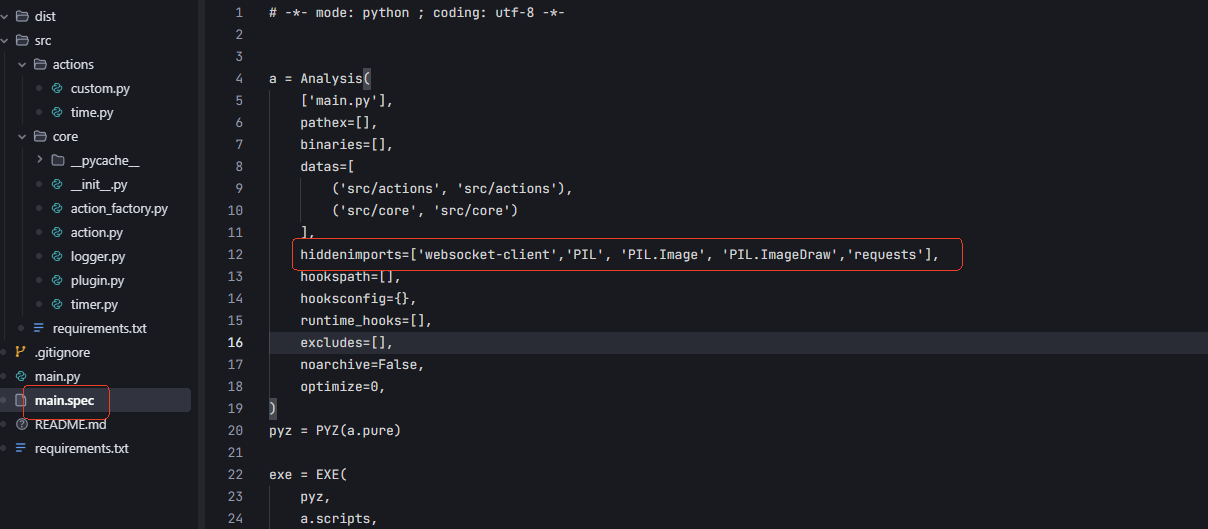
If you encounter module not found errors, this is because action_factory.py uses importlib.import_module to dynamically load classes under actions, and PyInstaller statically analyzes code during packaging. PyInstaller will consider modules only used in action as unused and won't package them into the exe. We can directly add the relevant modules to hiddenimports manually to resolve this.
Development Standards
- Use type annotations to ensure code type safety
- Follow PEP 8 coding standards
- Write unit tests to ensure code quality
- Use the built-in logging system to record critical information
License
This project is licensed under the MIT License. See the LICENSE file for details.